





-

Autel Scanner Solution for Nissan NV400 Engine Blockage Issue
Autel Scanner Solution for Nissan NV400 Engine Blockage Issue Issue Overview We have received reports from customers who have been trying to use their Autel scanner to clear the engine blockage caused by the anti-pollution system on a Nissan NV400. Unfortunately, many users have been unsuccessful in resolving this issue. This blog post will guide you through a solution to fix the bug and... -

Autel Scanner Software Subscription FAQ
Autel Scanner Software Subscription FAQ 1. What does the subscription include? With an active subscription, you will receive the latest software updates and gain access to online functions that require a connection to Autel servers. 2. If I haven't updated for two or three years, do I need to buy multiple years of subscription? No, you only need to subscribe for one year to... -
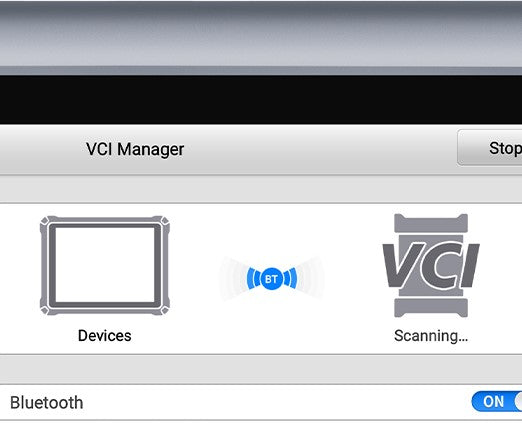
Troubleshooting: Autel Tablet VCI Bluetooth Connection Issues
Troubleshooting: Autel Tablet VCI Bluetooth Connection Issues If you're experiencing trouble connecting your Autel tablet's VCI (Vehicle Communication Interface) via Bluetooth, follow the steps below to help resolve the issue: Step 1: Update Software & VCI Firmware Start by ensuring all your software is up to date, including the VCI firmware. You can follow the update procedure in this video: How to Update VCI... -

How to Transfer Ownership of Your Autel Device to Another Person?
How to Transfer Ownership of Your Autel Device to Another Person? If you need to transfer your Autel device to a new user or you purchased a used Autel scan tool, follow these steps to ensure a smooth transition: 1. Ensure the New Owner Has an Autel ID Before transferring ownership, the new user must have an Autel ID. If they don't have one,... -

How to Reset Your Autel Account Password?
How to Reset Your Autel Account Password? If you've forgotten your Autel account password and need to reset it, follow the steps below. Let's go through a common scenario where a customer wants to update their scanner but has forgotten their account password. We strongly recommend that you perform these steps on your PC (not the Autel scanner). Step 1: Visit the Autel Website... -
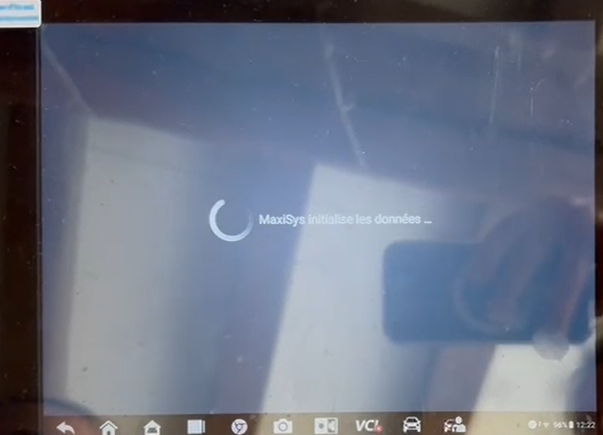
Fix Autel Maxisys MS908S PRO II Boot Issue
Autel Maxisys MS908S PRO II Won't Boot After Backing Up to SD Card If your Autel Maxisys MS908S PRO II is stuck on the loading screen after backing up data to an SD card, follow these troubleshooting steps: Possible Causes & Solutions: Check SD Card Capacity: The device supports a maximum of 64GB. If a larger SD card is used, it may cause compatibility... -
How to Troubleshoot Communication Issues on my Autel Scanner?
My Autel Scanner Has No Response - Troubleshooting Communication Issues Experiencing no response from your Autel Scanner? It could be a communication issue. Follow the troubleshooting steps below to help resolve the issue: 1. Check Bluetooth Connection Ensure that your scanner's Bluetooth is connected properly to the vehicle. A weak or intermittent Bluetooth connection can cause communication problems. 2. Check the Diagnostic Main Cable... -
How to Upload Data Logging on Autel MaxiSys Tablet
How to Upload Data Logging on Autel MaxiSys Tablet When diagnosing a vehicle with your Autel MaxiSys tablet and encountering an issue, you can upload a data log to help us understand and resolve the problem. Follow the steps below to upload your data log: Step 1: Start Data Logging When you encounter an issue while diagnosing, follow these steps to start the data... -

How to Upload MaxiTools Log for Troubleshooting
How to Upload MaxiTools Log for Troubleshooting If you're experiencing issues with your Autel device such as Wi-Fi, Bluetooth, or non-vehicle software problems, uploading a log file can help us diagnose the issue quickly. Below are step-by-step instructions to guide you through the process of uploading the log. Method 1: Uploading Log After Encountering an Issue When your device encounters a problem, it's best... -
Update Instructions - Autel TS201 / TS408 / TS501 / TS508 / TS508WF* / TS601
Update Instructions TS201 / TS408 / TS501 / TS508 / TS508WF* / TS601 STEP 1: ACCOUNT CREATION AND TOOL REGISTRATION (If you've already created an account AND registered the device, skip to STEP 2.) To create an account, click or visit: https://pro.autel.com/login.html. Register Tool After creating an account, or if you already have one, visit the same link as above and sign in. If... -

How to Update Autel MaxiTPMS TS401
TS401 Software Update Instructions Required Files: MaxiLinkII_V1.04 TS401_Update_GL_V5.61 Note: TS401 needs no registration. Step-by-Step Update Instructions: Download and Install MaxiLinkII: Click MaxiLinkII to download the application and install “MaxiLinkII” on your PC. After installation, the “MaxiLinkII” shortcut will appear on your desktop. Download TS401 Software Update Pack: Click TS401 Software Update Pack to download the zip file. To unzip the file, right-click on the... -

How to Flash Autel Maxisys Ultra?
How to Flash Autel Maxisys Ultra Preparation: Prepare an 8GB TF CARD in FAT32 format. (Must be 8GB) Unzip “dv2141” zip file and Copy the dv2141 folder to the TF card. Insert the TF card into the tablet, then restart the tablet, and it will automatically upgrade. After the upgrade is completed, a solid color background will be displayed. (A green background indicates a...


